Guides
Retrieval
Learn how to search your data using semantic similarity with the OpenAI API.
For the complete documentation index, see llms.txt. Markdown versions of documentation pages are available by appending
.mdto the page URL.
The Retrieval API allows you to perform semantic search over your data, which is a technique that surfaces semantically similar results—even when they match few or no keywords. Retrieval is useful on its own, but is especially powerful when combined with our models to synthesize responses.
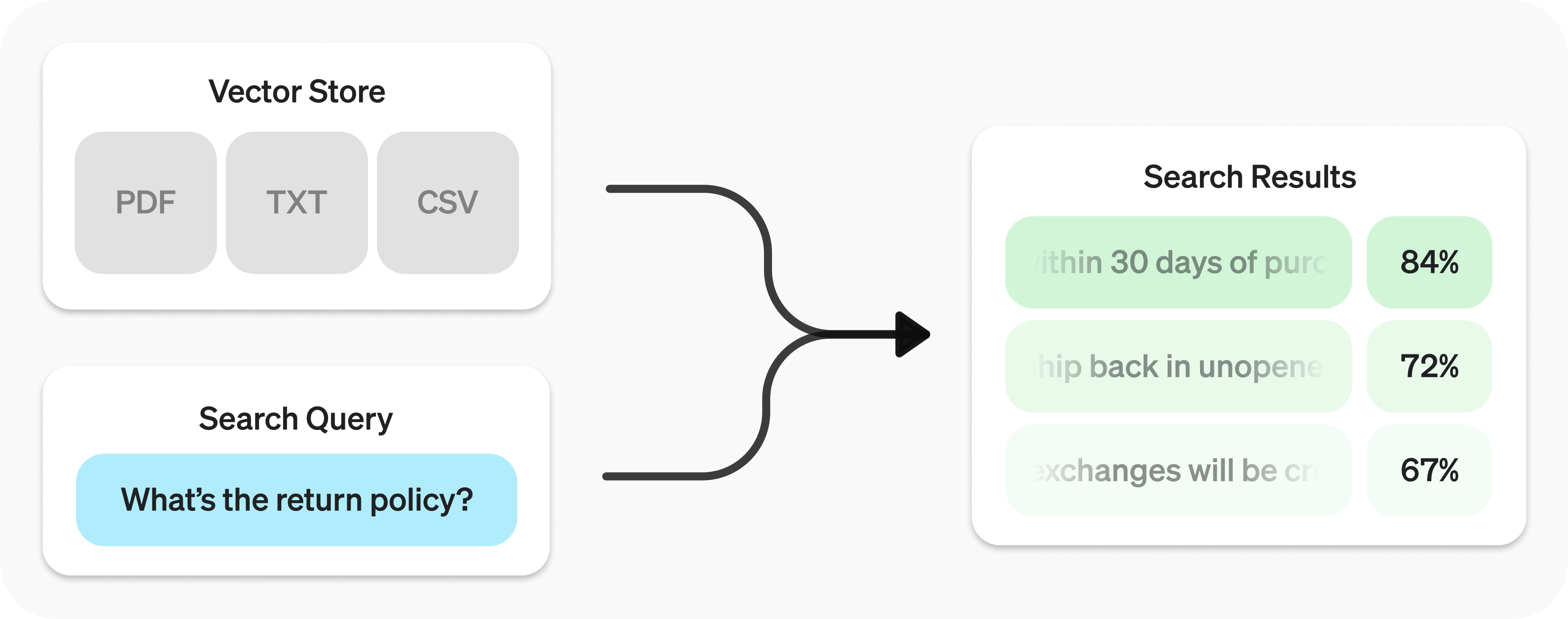
The Retrieval API is powered by vector stores, which serve as indices for your data. This guide will cover how to perform semantic search, and go into the details of vector stores.
Quickstart
Create vector store with files
import OpenAI from "openai";
const client = new OpenAI();

const vector_store = await client.vectorStores.create({
  // Create vector store
  name: "Support FAQ",
});

await client.vectorStores.files.uploadAndPoll(
  vector_store.id,
  // Upload file
  fs.createReadStream("customer_policies.txt")
);
from openai import OpenAI

client = OpenAI()

vector_store = client.vector_stores.create(        # Create vector store
    name="Support FAQ",
)

client.vector_stores.files.upload_and_poll(        # Upload file
    vector_store_id=vector_store.id,
    file=open("customer_policies.txt", "rb")
)
package main

import (
	"context"
	"fmt"
	"os"

	"github.com/openai/openai-go/v3"
)

func main() {
	client := openai.NewClient()
	vectorStore, err := client.VectorStores.New(context.Background(), openai.VectorStoreNewParams{Name: openai.String("Support FAQ")})
	if err != nil {
		panic(err)
	}
	file, err := os.Open("customer_policies.txt")
	if err != nil {
		panic(err)
	}
	defer file.Close()
	_, err = client.VectorStores.Files.UploadAndPoll(context.Background(), vectorStore.ID, openai.FileNewParams{
		File:    openai.File(file, "customer_policies.txt", "text/plain"),
		Purpose: openai.FilePurposeAssistants,
	}, 1000)
	if err != nil {
		panic(err)
	}
	fmt.Println(vectorStore.ID)
}
import com.openai.client.OpenAIClient;
import com.openai.client.okhttp.OpenAIOkHttpClient;
import com.openai.models.files.FileCreateParams;
import com.openai.models.files.FilePurpose;
import com.openai.models.vectorstores.VectorStoreCreateParams;
import com.openai.models.vectorstores.files.FileRetrieveParams;
import com.openai.models.vectorstores.files.VectorStoreFile;
import java.nio.file.Path;

var store =
    client.vectorStores().create(VectorStoreCreateParams.builder().name("Support FAQ").build());
var uploaded =
    client
        .files()
        .create(
            FileCreateParams.builder()
                .file(Path.of(System.getenv("OPENAI_EXAMPLE_FILE_PATH")))
                .purpose(FilePurpose.ASSISTANTS)
                .build());
var file =
    client
        .vectorStores()
        .files()
        .create(
            store.id(),
            com.openai.models.vectorstores.files.FileCreateParams.builder()
                .fileId(uploaded.id())
                .build());
while (file.status().equals(VectorStoreFile.Status.IN_PROGRESS)) {
  Thread.sleep(1000);
  file =
      client
          .vectorStores()
          .files()
          .retrieve(file.id(), FileRetrieveParams.builder().vectorStoreId(store.id()).build());
}
System.out.println(store.id());
require "openai"
require "pathname"

client = OpenAI::Client.new
store = client.vector_stores.create(name: "Support FAQ")
source = Pathname("customer_policies.txt")
uploaded = client.files.create(file: source, purpose: :assistants)
file = client.vector_stores.files.create(store.id, file_id: uploaded.id)
until [:completed, :failed, :cancelled].include?(file.status)
  sleep(1)
  file = client.vector_stores.files.retrieve(file.id, vector_store_id: store.id)
end

puts(store.id)
Search query
const userQuery = "What is the return policy?";

const results = await client.vectorStores.search(vector_store.id, {
  query: userQuery,
});
user_query = "What is the return policy?"

results = client.vector_stores.search(
    vector_store_id=vector_store.id,
    query=user_query,
)
package main

import (
	"context"
	"fmt"

	"github.com/openai/openai-go/v3"
)

func main() {
	client := openai.NewClient()
	results, err := client.VectorStores.Search(context.Background(), "vs_123", openai.VectorStoreSearchParams{
		Query: openai.VectorStoreSearchParamsQueryUnion{OfString: openai.String("What is the return policy?")},
	})
	if err != nil {
		panic(err)
	}
	fmt.Println(results.Data)
}
import com.openai.client.OpenAIClient;
import com.openai.client.okhttp.OpenAIOkHttpClient;
import com.openai.models.vectorstores.VectorStoreSearchParams;

String vectorStoreId = "vs_123";

var results =
    client
        .vectorStores()
        .search(
            vectorStoreId,
            VectorStoreSearchParams.builder().query("What is the return policy?").build());

System.out.println(results.data());
require "openai"

client = OpenAI::Client.new
results = client.vector_stores.search("vs_123", query: "What is the return policy?")
puts(results.data&.first&.content)
To learn how to use the results with our models, check out the synthesizing responses section.
Semantic search
Semantic search is a technique that leverages vector embeddings to surface semantically relevant results. Importantly, this includes results with few or no shared keywords, which classical search techniques might miss.
For example, let's look at potential results for "When did we go to the moon?":
| Text | Keyword Similarity | Semantic Similarity |
|---|---|---|
| The first lunar landing occurred in July of 1969. | 0% | 65% |
| The first man on the moon was Neil Armstrong. | 27% | 43% |
| When I ate the moon cake, it was delicious. | 40% | 28% |
(Keyword similarity uses intersection over union↗; semantic similarity uses cosine similarity↗ with text-embedding-3-small.)
Notice how the most relevant result contains none of the words in the search query. This flexibility makes semantic search a powerful technique for querying knowledge bases of any size.
Semantic search is powered by vector stores, which we cover in detail later in the guide. This section will focus on the mechanics of semantic search.
Performing semantic search
You can query a vector store using the search function and specifying a query in natural language. This will return a list of results, each with the relevant chunks, similarity scores, and file of origin.
Search query
const results = await client.vectorStores.search(vector_store.id, {
  query: "How many woodchucks are allowed per passenger?",
});
results = client.vector_stores.search(
    vector_store_id=vector_store.id,
    query="How many woodchucks are allowed per passenger?",
)
package main

import (
	"context"
	"fmt"

	"github.com/openai/openai-go/v3"
)

func main() {
	client := openai.NewClient()
	results, err := client.VectorStores.Search(context.Background(), "vs_123", openai.VectorStoreSearchParams{
		Query: openai.VectorStoreSearchParamsQueryUnion{OfString: openai.String("How many woodchucks are allowed per passenger?")},
	})
	if err != nil {
		panic(err)
	}
	fmt.Println(results.Data)
}
import com.openai.client.OpenAIClient;
import com.openai.client.okhttp.OpenAIOkHttpClient;
import com.openai.models.vectorstores.VectorStoreSearchParams;

String vectorStoreId = "vs_123";

var results =
    client
        .vectorStores()
        .search(
            vectorStoreId,
            VectorStoreSearchParams.builder()
                .query("How many woodchucks are allowed per passenger?")
                .build());

System.out.println(results.data());
require "openai"

client = OpenAI::Client.new
results = client.vector_stores.search(
  "vs_123",
  query: "How many woodchucks are allowed per passenger?"
)
puts(results.data&.first&.content)
Results
{
  "object": "vector_store.search_results.page",
  "search_query": "How many woodchucks are allowed per passenger?",
  "data": [
    {
      "file_id": "file-12345",
      "filename": "woodchuck_policy.txt",
      "score": 0.85,
      "attributes": {
        "region": "North America",
        "author": "Wildlife Department"
      },
      "content": [
        {
          "type": "text",
          "text": "According to the latest regulations, each passenger is allowed to carry up to two woodchucks."
        },
        {
          "type": "text",
          "text": "Ensure that the woodchucks are properly contained during transport."
        }
      ]
    },
    {
      "file_id": "file-67890",
      "filename": "transport_guidelines.txt",
      "score": 0.75,
      "attributes": {
        "region": "North America",
        "author": "Transport Authority"
      },
      "content": [
        {
          "type": "text",
          "text": "Passengers must adhere to the guidelines set forth by the Transport Authority regarding the transport of woodchucks."
        }
      ]
    }
  ],
  "has_more": false,
  "next_page": null
}
A response will contain 10 results maximum by default, but you can set up to 50 using the max_num_results parameter.
Query rewriting
Certain query styles yield better results, so we've provided a setting to automatically rewrite your queries for optimal performance. Enable this feature by setting rewrite_query=true when performing a search.
The rewritten query will be available in the result's search_query field.
| Original | Rewritten |
|---|---|
| I'd like to know the height of the main office building. | primary office building height |
| What are the safety regulations for transporting hazardous materials? | safety regulations for hazardous materials |
| How do I file a complaint about a service issue? | service complaint filing process |
Attribute filtering
Attribute filtering helps narrow down results by applying criteria, such as restricting searches to a specific date range. You can define and combine criteria in attribute_filter to target files based on their attributes before performing semantic search.
Use comparison filters to compare a specific key in a file's attributes with a given value, and compound filters to combine multiple filters using and and or.
Comparison filter
{
  "type": "eq" | "ne" | "gt" | "gte" | "lt" | "lte" | "in" | "nin",  // comparison operators
  "key": "attributes_key",                           // attributes key
  "value": "target_value"                             // value to compare against
}
Compound filter
{
  "type": "and" | "or",                                // logical operators
  "filters": [...]
}
Below are some example filters.
Region
Filter for a region
{
  "type": "eq",
  "key": "region",
  "value": "us"
}
Date range
Filter for a date range
{
  "type": "and",
  "filters": [
    {
      "type": "gte",
      "key": "date",
      "value": 1704067200  // unix timestamp for 2024-01-01
    },
    {
      "type": "lte",
      "key": "date",
      "value": 1710892800  // unix timestamp for 2024-03-20
    }
  ]
}
Filenames
Filter to match any of a set of filenames
{
  "type": "in",
  "property": "filename",
  "value": ["example.txt", "example2.txt"]
}
Exclude filenames
Filter to exclude drafts by filename
{
  "type": "nin",
  "property": "filename",
  "value": ["draft.txt", "internal_notes.md"]
}
Complex
Filter for top secret projects with certain names in english
{
  "type": "or",
  "filters": [
    {
      "type": "and",
      "filters": [
        {
          "type": "or",
          "filters": [
            {
              "type": "eq",
              "key": "project_code",
              "value": "X123"
            },
            {
              "type": "eq",
              "key": "project_code",
              "value": "X999"
            }
          ]
        },
        {
          "type": "eq",
          "key": "confidentiality",
          "value": "top_secret"
        }
      ]
    },
    {
      "type": "eq",
      "key": "language",
      "value": "en"
    }
  ]
}
Ranking
If you find that your file search results are not sufficiently relevant, you can adjust the ranking_options to improve the quality of responses. This includes specifying a ranker, such as auto or default-2024-08-21, and setting a score_threshold between 0.0 and 1.0. A higher score_threshold will limit the results to more relevant chunks, though it may exclude some potentially useful ones. When ranking_options.hybrid_search is provided you can also tune hybrid_search.embedding_weight (rrf_embedding_weight) and hybrid_search.text_weight (rrf_text_weight) to control how reciprocal rank fusion balances semantic embedding matches vs. sparse keyword matches. Increase the former to emphasize semantic similarity, increase the latter to emphasize textual overlap, and ensure at least one of the weights is greater than zero.
Vector stores
Vector stores are the containers that power semantic search for the Retrieval API and the file search tool. When you add a file to a vector store it will be automatically chunked, embedded, and indexed.
Vector stores contain vector_store_file objects, which are backed by a file object.
| Object type | Description |
|---|---|
file | Represents content uploaded through the Files API. Often used with vector stores, but also for fine-tuning and other use cases. |
vector_store | Container for searchable files. |
vector_store.file | Wrapper type specifically representing a file that has been chunked and embedded, and has been associated with a vector_store. Contains attributes map used for filtering. |
Pricing
You will be charged based on the total storage used across all your vector stores, determined by the size of parsed chunks and their corresponding embeddings.
| Storage | Cost |
|---|---|
| Up to 1 GB (across all stores) | Free |
| Beyond 1 GB | $0.10/GB/day |
See expiration policies for options to minimize costs.
Vector store operations
Create
Create vector store
await client.vectorStores.create({
  name: "Support FAQ",
  file_ids: ["file_123"],
});
client.vector_stores.create(
    name="Support FAQ",
    file_ids=["file_123"]
)
package main

import (
	"context"
	"fmt"

	"github.com/openai/openai-go/v3"
)

func main() {
	client := openai.NewClient()
	vectorStore, err := client.VectorStores.New(context.Background(), openai.VectorStoreNewParams{
		Name:    openai.String("Support FAQ"),
		FileIDs: []string{"file_123"},
	})
	if err != nil {
		panic(err)
	}
	fmt.Println(vectorStore.ID)
}
import com.openai.client.OpenAIClient;
import com.openai.client.okhttp.OpenAIOkHttpClient;
import com.openai.models.vectorstores.VectorStoreCreateParams;

String fileId = "file_123";

var store =
    client
        .vectorStores()
        .create(
            VectorStoreCreateParams.builder().name("Support FAQ").addFileId(fileId).build());

System.out.println(store.id());
require "openai"

client = OpenAI::Client.new
store = client.vector_stores.create(
  name: "Support FAQ",
  file_ids: ["file_123"]
)
puts(store.id)
Retrieve
Retrieve vector store
await client.vectorStores.retrieve("vs_123");
client.vector_stores.retrieve(
    vector_store_id="vs_123"
)
package main

import (
	"context"
	"fmt"

	"github.com/openai/openai-go/v3"
)

func main() {
	client := openai.NewClient()
	vectorStore, err := client.VectorStores.Get(context.Background(), "vs_123")
	if err != nil {
		panic(err)
	}
	fmt.Println(vectorStore.ID)
}
import com.openai.client.OpenAIClient;
import com.openai.client.okhttp.OpenAIOkHttpClient;

String vectorStoreId = "vs_123";

System.out.println(client.vectorStores().retrieve(vectorStoreId).id());
require "openai"

client = OpenAI::Client.new
store = client.vector_stores.retrieve("vs_123")
puts(store.id)
Update
Update vector store
await client.vectorStores.update("vs_123", {
  name: "Support FAQ Updated",
});
client.vector_stores.update(
    vector_store_id="vs_123",
    name="Support FAQ Updated"
)
package main

import (
	"context"
	"fmt"

	"github.com/openai/openai-go/v3"
)

func main() {
	client := openai.NewClient()
	vectorStore, err := client.VectorStores.Update(context.Background(), "vs_123", openai.VectorStoreUpdateParams{
		Name: openai.String("Support FAQ Updated"),
	})
	if err != nil {
		panic(err)
	}
	fmt.Println(vectorStore.Name)
}
import com.openai.client.OpenAIClient;
import com.openai.client.okhttp.OpenAIOkHttpClient;
import com.openai.models.vectorstores.VectorStoreUpdateParams;

String vectorStoreId = "vs_123";

var store =
    client
        .vectorStores()
        .update(
            vectorStoreId,
            VectorStoreUpdateParams.builder().name("Updated knowledge base").build());

System.out.println(store.name());
require "openai"

client = OpenAI::Client.new
store = client.vector_stores.update("vs_123", name: "Updated knowledge base")
puts(store.name)
Delete
Delete vector store
await client.vectorStores.delete("vs_123");
client.vector_stores.delete(
    vector_store_id="vs_123"
)
package main

import (
	"context"
	"fmt"

	"github.com/openai/openai-go/v3"
)

func main() {
	client := openai.NewClient()
	deleted, err := client.VectorStores.Delete(context.Background(), "vs_123")
	if err != nil {
		panic(err)
	}
	fmt.Println(deleted.Deleted)
}
import com.openai.client.OpenAIClient;
import com.openai.client.okhttp.OpenAIOkHttpClient;

String vectorStoreId = "vs_123";

System.out.println(client.vectorStores().delete(vectorStoreId).deleted());
require "openai"

client = OpenAI::Client.new
deleted = client.vector_stores.delete("vs_123")
puts(deleted.deleted)
List
List vector stores
await client.vectorStores.list();
client.vector_stores.list()
package main

import (
	"context"
	"fmt"

	"github.com/openai/openai-go/v3"
)

func main() {
	client := openai.NewClient()
	vectorStores, err := client.VectorStores.List(context.Background(), openai.VectorStoreListParams{})
	if err != nil {
		panic(err)
	}
	fmt.Println(vectorStores.Data)
}
import com.openai.client.OpenAIClient;
import com.openai.client.okhttp.OpenAIOkHttpClient;

System.out.println(client.vectorStores().list().data());
require "openai"

client = OpenAI::Client.new
stores = client.vector_stores.list(limit: 10)
puts((stores.data || []).length)
Vector store file operations
Some operations, like create for vector_store.file, are asynchronous and may take time to complete—use our helper functions, like create_and_poll to block until it is. Otherwise, you may check the status. Removing files from a vector store is eventually consistent, and search results may still include content from a removed file for a short period.
Adding files is rate limited per vector store ID. Requests to /vector_stores/{vector_store_id}/files and /vector_stores/{vector_store_id}/file_batches share a per-vector-store limit of 300 requests per minute.
Create
Create vector store file
await client.vectorStores.files.createAndPoll("vs_123", {
  file_id: "file_123",
});
client.vector_stores.files.create_and_poll(
    vector_store_id="vs_123",
    file_id="file_123"
)
package main

import (
	"context"
	"fmt"

	"github.com/openai/openai-go/v3"
)

func main() {
	client := openai.NewClient()
	file, err := client.VectorStores.Files.NewAndPoll(context.Background(), "vs_123", openai.VectorStoreFileNewParams{
		FileID: "file_123",
	}, 1000)
	if err != nil {
		panic(err)
	}
	fmt.Println(file.ID)
}
import com.openai.client.OpenAIClient;
import com.openai.client.okhttp.OpenAIOkHttpClient;
import com.openai.models.vectorstores.files.FileCreateParams;

String vectorStoreId = "vs_123";

String fileId = "file_123";

var file =
    client
        .vectorStores()
        .files()
        .create(vectorStoreId, FileCreateParams.builder().fileId(fileId).build());

System.out.println(file.id());
require "openai"

client = OpenAI::Client.new
file = client.vector_stores.files.create("vs_123", file_id: "file_123")
puts(file.id)
Upload
Upload vector store file
await client.vectorStores.files.uploadAndPoll(
  "vs_123",
  fs.createReadStream("customer_policies.txt")
);
client.vector_stores.files.upload_and_poll(
    vector_store_id="vs_123",
    file=open("customer_policies.txt", "rb")
)
package main

import (
	"context"
	"fmt"
	"os"

	"github.com/openai/openai-go/v3"
)

func main() {
	client := openai.NewClient()
	file, err := os.Open("customer_policies.txt")
	if err != nil {
		panic(err)
	}
	defer file.Close()
	result, err := client.VectorStores.Files.UploadAndPoll(context.Background(), "vs_123", openai.FileNewParams{
		File:    openai.File(file, "customer_policies.txt", "text/plain"),
		Purpose: openai.FilePurposeAssistants,
	}, 1000)
	if err != nil {
		panic(err)
	}
	fmt.Println(result.ID)
}
import com.openai.client.OpenAIClient;
import com.openai.client.okhttp.OpenAIOkHttpClient;
import com.openai.models.files.FileCreateParams;
import com.openai.models.files.FilePurpose;
import com.openai.models.vectorstores.files.FileRetrieveParams;
import com.openai.models.vectorstores.files.VectorStoreFile;
import java.nio.file.Path;

String vectorStoreId = "vs_123";
var uploaded =
    client
        .files()
        .create(
            FileCreateParams.builder()
                .file(Path.of(System.getenv("OPENAI_EXAMPLE_FILE_PATH")))
                .purpose(FilePurpose.ASSISTANTS)
                .build());
var file =
    client
        .vectorStores()
        .files()
        .create(
            vectorStoreId,
            com.openai.models.vectorstores.files.FileCreateParams.builder()
                .fileId(uploaded.id())
                .build());
while (file.status().equals(VectorStoreFile.Status.IN_PROGRESS)) {
  Thread.sleep(1000);
  file =
      client
          .vectorStores()
          .files()
          .retrieve(
              file.id(), FileRetrieveParams.builder().vectorStoreId(vectorStoreId).build());
}
System.out.println(file.id());
require "openai"
require "pathname"

client = OpenAI::Client.new
file = Pathname("customer_policies.txt")
uploaded = client.files.create(file: file, purpose: :assistants)
vector_store_file = client.vector_stores.files.create(
  "vs_123",
  file_id: uploaded.id
)
until [:completed, :failed, :cancelled].include?(vector_store_file.status)
  sleep(1)
  vector_store_file = client.vector_stores.files.retrieve(
    vector_store_file.id,
    vector_store_id: "vs_123"
  )
end
puts(vector_store_file.id)
Retrieve
Retrieve vector store file
await client.vectorStores.files.retrieve("file_123", {
  vector_store_id: "vs_123",
});
client.vector_stores.files.retrieve(
    vector_store_id="vs_123",
    file_id="file_123"
)
package main

import (
	"context"
	"fmt"

	"github.com/openai/openai-go/v3"
)

func main() {
	client := openai.NewClient()
	file, err := client.VectorStores.Files.Get(context.Background(), "vs_123", "file_123")
	if err != nil {
		panic(err)
	}
	fmt.Println(file.ID)
}
import com.openai.client.OpenAIClient;
import com.openai.client.okhttp.OpenAIOkHttpClient;

String fileId = "file_123";

String vectorStoreId = "vs_123";

System.out.println(
    client
        .vectorStores()
        .files()
        .retrieve(
            fileId,
            com.openai.models.vectorstores.files.FileRetrieveParams.builder()
                .vectorStoreId(vectorStoreId)
                .build())
        .id());
require "openai"

client = OpenAI::Client.new
file = client.vector_stores.files.retrieve("file_123", vector_store_id: "vs_123")
puts(file.id)
Update
Update vector store file
await client.vectorStores.files.update("file_123", {
  vector_store_id: "vs_123",
  attributes: { key: "value" },
});
client.vector_stores.files.update(
    vector_store_id="vs_123",
    file_id="file_123",
    attributes={"key": "value"}
)
package main

import (
	"context"
	"fmt"

	"github.com/openai/openai-go/v3"
)

func main() {
	client := openai.NewClient()
	file, err := client.VectorStores.Files.Update(context.Background(), "vs_123", "file_123", openai.VectorStoreFileUpdateParams{
		Attributes: map[string]openai.VectorStoreFileUpdateParamsAttributeUnion{
			"key": {OfString: openai.String("value")},
		},
	})
	if err != nil {
		panic(err)
	}
	fmt.Println(file.ID)
}
import com.openai.client.OpenAIClient;
import com.openai.client.okhttp.OpenAIOkHttpClient;
import com.openai.core.JsonValue;
import com.openai.models.vectorstores.files.FileUpdateParams;

String fileId = "file_123";

String vectorStoreId = "vs_123";

var file =
    client
        .vectorStores()
        .files()
        .update(
            fileId,
            FileUpdateParams.builder()
                .vectorStoreId(vectorStoreId)
                .attributes(
                    FileUpdateParams.Attributes.builder()
                        .putAdditionalProperty("category", JsonValue.from("policy"))
                        .build())
                .build());

System.out.println(file.id());
require "openai"

client = OpenAI::Client.new
file = client.vector_stores.files.update("file_123", vector_store_id: "vs_123", attributes: {category: "policy"})
puts(file.id)
Delete
Delete vector store file
await client.vectorStores.files.delete("file_123", {
  vector_store_id: "vs_123",
});
client.vector_stores.files.delete(
    vector_store_id="vs_123",
    file_id="file_123"
)
package main

import (
	"context"
	"fmt"

	"github.com/openai/openai-go/v3"
)

func main() {
	client := openai.NewClient()
	deleted, err := client.VectorStores.Files.Delete(context.Background(), "vs_123", "file_123")
	if err != nil {
		panic(err)
	}
	fmt.Println(deleted.Deleted)
}
import com.openai.client.OpenAIClient;
import com.openai.client.okhttp.OpenAIOkHttpClient;

String fileId = "file_123";

String vectorStoreId = "vs_123";

System.out.println(
    client
        .vectorStores()
        .files()
        .delete(
            fileId,
            com.openai.models.vectorstores.files.FileDeleteParams.builder()
                .vectorStoreId(vectorStoreId)
                .build())
        .deleted());
require "openai"

client = OpenAI::Client.new
deleted = client.vector_stores.files.delete("file_123", vector_store_id: "vs_123")
puts(deleted.deleted)
List
List vector store files
await client.vectorStores.files.list("vs_123");
client.vector_stores.files.list(
    vector_store_id="vs_123"
)
package main

import (
	"context"
	"fmt"

	"github.com/openai/openai-go/v3"
)

func main() {
	client := openai.NewClient()
	files, err := client.VectorStores.Files.List(context.Background(), "vs_123", openai.VectorStoreFileListParams{})
	if err != nil {
		panic(err)
	}
	fmt.Println(files.Data)
}
import com.openai.client.OpenAIClient;
import com.openai.client.okhttp.OpenAIOkHttpClient;

String vectorStoreId = "vs_123";

System.out.println(client.vectorStores().files().list(vectorStoreId).data());
require "openai"

client = OpenAI::Client.new
files = client.vector_stores.files.list("vs_123")
puts((files.data || []).length)
Batch operations
Create
Batch create operation
await client.vectorStores.fileBatches.createAndPoll("vs_123", {
  files: [
    {
      file_id: "file_123",
      attributes: { department: "finance" },
    },
    {
      file_id: "file_456",
      chunking_strategy: {
        type: "static",
        static: {
          max_chunk_size_tokens: 1200,
          chunk_overlap_tokens: 200,
        },
      },
    },
  ],
});
client.vector_stores.file_batches.create_and_poll(
    vector_store_id="vs_123",
    files=[
        {
            "file_id": "file_123",
            "attributes": {"department": "finance"}
        },
        {
            "file_id": "file_456",
            "chunking_strategy": {
                "type": "static",
                "max_chunk_size_tokens": 1200,
                "chunk_overlap_tokens": 200
            }
        }
    ]
)
package main

import (
	"context"
	"fmt"

	"github.com/openai/openai-go/v3"
)

func main() {
	client := openai.NewClient()
	batch, err := client.VectorStores.FileBatches.NewAndPoll(context.Background(), "vs_123", openai.VectorStoreFileBatchNewParams{
		Files: []openai.VectorStoreFileBatchNewParamsFile{
			{
				FileID: "file_123",
				Attributes: map[string]openai.VectorStoreFileBatchNewParamsFileAttributeUnion{
					"department": {OfString: openai.String("finance")},
				},
			},
			{
				FileID: "file_456",
				ChunkingStrategy: openai.FileChunkingStrategyParamUnion{OfStatic: &openai.StaticFileChunkingStrategyObjectParam{
					Static: openai.StaticFileChunkingStrategyParam{MaxChunkSizeTokens: 1200, ChunkOverlapTokens: 200},
				}},
			},
		},
	}, 1000)
	if err != nil {
		panic(err)
	}
	fmt.Println(batch.ID)
}
import com.openai.client.OpenAIClient;
import com.openai.client.okhttp.OpenAIOkHttpClient;
import com.openai.core.JsonValue;
import com.openai.models.vectorstores.StaticFileChunkingStrategy;
import com.openai.models.vectorstores.filebatches.FileBatchCreateParams;
import com.openai.models.vectorstores.filebatches.FileBatchRetrieveParams;
import com.openai.models.vectorstores.filebatches.VectorStoreFileBatch;

String vectorStoreId = "vs_123";
String fileId = "file_123";
String fileId2 = "file_456";
var first =
    FileBatchCreateParams.File.builder()
        .fileId(fileId)
        .attributes(
            FileBatchCreateParams.File.Attributes.builder()
                .putAdditionalProperty("department", JsonValue.from("finance"))
                .build())
        .build();
var second =
    FileBatchCreateParams.File.builder()
        .fileId(fileId2)
        .staticChunkingStrategy(
            StaticFileChunkingStrategy.builder()
                .maxChunkSizeTokens(1200)
                .chunkOverlapTokens(200)
                .build())
        .build();

var batch =
    client
        .vectorStores()
        .fileBatches()
        .create(
            vectorStoreId,
            FileBatchCreateParams.builder().addFile(first).addFile(second).build());
while (batch.status().equals(VectorStoreFileBatch.Status.IN_PROGRESS)) {
  Thread.sleep(1000);
  batch =
      client
          .vectorStores()
          .fileBatches()
          .retrieve(
              batch.id(),
              FileBatchRetrieveParams.builder().vectorStoreId(vectorStoreId).build());
}
System.out.println(batch.status());
require "openai"

client = OpenAI::Client.new
batch = client.vector_stores.file_batches.create(
  "vs_123",
  files: [
    {file_id: "file_123", attributes: {department: "finance"}},
    {
      file_id: "file_456",
      chunking_strategy: {
        type: :static,
        max_chunk_size_tokens: 1_200,
        chunk_overlap_tokens: 200
      }
    }
  ]
)
until [:completed, :failed, :cancelled].include?(batch.status)
  sleep(1)
  batch = client.vector_stores.file_batches.retrieve(
    batch.id,
    vector_store_id: "vs_123"
  )
end
puts(batch.status)
Retrieve
Batch retrieve operation
await client.vectorStores.fileBatches.retrieve("vsfb_123", {
  vector_store_id: "vs_123",
});
client.vector_stores.file_batches.retrieve(
    vector_store_id="vs_123",
    batch_id="vsfb_123"
)
package main

import (
	"context"
	"fmt"

	"github.com/openai/openai-go/v3"
)

func main() {
	client := openai.NewClient()
	batch, err := client.VectorStores.FileBatches.Get(context.Background(), "vs_123", "vsfb_123")
	if err != nil {
		panic(err)
	}
	fmt.Println(batch.ID)
}
import com.openai.client.OpenAIClient;
import com.openai.client.okhttp.OpenAIOkHttpClient;

String fileBatchId = "vsfb_123";

String vectorStoreId = "vs_123";

System.out.println(
    client
        .vectorStores()
        .fileBatches()
        .retrieve(
            fileBatchId,
            com.openai.models.vectorstores.filebatches.FileBatchRetrieveParams.builder()
                .vectorStoreId(vectorStoreId)
                .build())
        .status());
require "openai"

client = OpenAI::Client.new
batch = client.vector_stores.file_batches.retrieve(
  "vsfb_123",
  vector_store_id: "vs_123"
)
puts(batch.status)
Cancel
Batch cancel operation
await client.vectorStores.fileBatches.cancel("vsfb_123", {
  vector_store_id: "vs_123",
});
client.vector_stores.file_batches.cancel(
    vector_store_id="vs_123",
    batch_id="vsfb_123"
)
package main

import (
	"context"
	"fmt"

	"github.com/openai/openai-go/v3"
)

func main() {
	client := openai.NewClient()
	batch, err := client.VectorStores.FileBatches.Cancel(context.Background(), "vs_123", "vsfb_123")
	if err != nil {
		panic(err)
	}
	fmt.Println(batch.Status)
}
import com.openai.client.OpenAIClient;
import com.openai.client.okhttp.OpenAIOkHttpClient;

String fileBatchId = "vsfb_123";

String vectorStoreId = "vs_123";

System.out.println(
    client
        .vectorStores()
        .fileBatches()
        .cancel(
            fileBatchId,
            com.openai.models.vectorstores.filebatches.FileBatchCancelParams.builder()
                .vectorStoreId(vectorStoreId)
                .build())
        .status());
require "openai"

client = OpenAI::Client.new
batch = client.vector_stores.file_batches.cancel(
  "vsfb_123",
  vector_store_id: "vs_123"
)
puts(batch.status)
List
List files in a batch
await client.vectorStores.fileBatches.listFiles("vsfb_123", {
  vector_store_id: "vs_123",
});
client.vector_stores.file_batches.list_files(
    "vsfb_123",
    vector_store_id="vs_123"
)
package main

import (
	"context"
	"fmt"

	"github.com/openai/openai-go/v3"
)

func main() {
	client := openai.NewClient()
	files, err := client.VectorStores.FileBatches.ListFiles(context.Background(), "vs_123", "vsfb_123", openai.VectorStoreFileBatchListFilesParams{})
	if err != nil {
		panic(err)
	}
	fmt.Println(files.Data)
}
import com.openai.client.OpenAIClient;
import com.openai.client.okhttp.OpenAIOkHttpClient;

String fileBatchId = "vsfb_123";

String vectorStoreId = "vs_123";

System.out.println(
    client
        .vectorStores()
        .fileBatches()
        .listFiles(
            fileBatchId,
            com.openai.models.vectorstores.filebatches.FileBatchListFilesParams.builder()
                .vectorStoreId(vectorStoreId)
                .build())
        .data());
require "openai"

client = OpenAI::Client.new
files = client.vector_stores.file_batches.list_files(
  "vsfb_123",
  vector_store_id: "vs_123"
)
puts((files.data || []).length)
When creating a batch you can either provide file_ids with optional attributes and/or chunking_strategy, or use the files array to pass objects that include a file_id plus optional attributes and chunking_strategy for each file. The two options are mutually exclusive so that you can cleanly control whether every file shares the same settings or you need per-file overrides.
For higher-throughput ingestion into a single vector store, we recommend batch creation whenever possible. Batches can include up to 500 files in one request, which usually reduces contention and improves end-to-end latency versus sending many single-file create requests.
Attributes
Each vector_store.file can have associated attributes, a dictionary of values that can be referenced when performing semantic search with attribute filtering. The dictionary can have at most 16 keys, with a limit of 256 characters each.
Create vector store file with attributes
await client.vectorStores.files.create("<vector_store_id>", {
  file_id: "file_123",
  attributes: {
    region: "US",
    category: "Marketing",
    date: 1672531200, // Jan 1, 2023
  },
});
client.vector_stores.files.create(
    vector_store_id="<vector_store_id>",
    file_id="file_123",
    attributes={
        "region": "US",
        "category": "Marketing",
        "date": 1672531200      # Jan 1, 2023
    }
)
package main

import (
	"context"
	"fmt"

	"github.com/openai/openai-go/v3"
)

func main() {
	client := openai.NewClient()
	file, err := client.VectorStores.Files.New(context.Background(), "<vector_store_id>", openai.VectorStoreFileNewParams{
		FileID: "file_123",
		Attributes: map[string]openai.VectorStoreFileNewParamsAttributeUnion{
			"region":   {OfString: openai.String("US")},
			"category": {OfString: openai.String("Marketing")},
			"date":     {OfFloat: openai.Float(1672531200)},
		},
	})
	if err != nil {
		panic(err)
	}
	fmt.Println(file.ID)
}
import com.openai.client.OpenAIClient;
import com.openai.client.okhttp.OpenAIOkHttpClient;
import com.openai.core.JsonValue;
import com.openai.models.vectorstores.files.FileCreateParams;

String vectorStoreId = "<vector_store_id>";

String fileId = "file_123";

var file =
    client
        .vectorStores()
        .files()
        .create(
            vectorStoreId,
            FileCreateParams.builder()
                .fileId(fileId)
                .attributes(
                    FileCreateParams.Attributes.builder()
                        .putAdditionalProperty("category", JsonValue.from("policy"))
                        .build())
                .build());

System.out.println(file.id());
require "openai"

client = OpenAI::Client.new
file = client.vector_stores.files.create("<vector_store_id>", file_id: "file_123", attributes: {category: "policy"})
puts(file.id)
Expiration policies
You can set an expiration policy on vector_store objects with expires_after. Once a vector store expires, all associated vector_store.file objects will be deleted and you'll no longer be charged for them.
Set expiration policy for vector store
await client.vectorStores.update("vs_123", {
  expires_after: {
    anchor: "last_active_at",
    days: 7,
  },
});
client.vector_stores.update(
    vector_store_id="vs_123",
    expires_after={
        "anchor": "last_active_at",
        "days": 7
    }
)
package main

import (
	"context"
	"fmt"

	"github.com/openai/openai-go/v3"
)

func main() {
	client := openai.NewClient()
	vectorStore, err := client.VectorStores.Update(context.Background(), "vs_123", openai.VectorStoreUpdateParams{
		ExpiresAfter: openai.VectorStoreUpdateParamsExpiresAfter{Days: 7},
	})
	if err != nil {
		panic(err)
	}
	fmt.Println(vectorStore.ExpiresAfter)
}
import com.openai.client.OpenAIClient;
import com.openai.client.okhttp.OpenAIOkHttpClient;
import com.openai.core.JsonValue;
import com.openai.models.vectorstores.VectorStoreUpdateParams;

String vectorStoreId = "vs_123";

var store =
    client
        .vectorStores()
        .update(
            vectorStoreId,
            VectorStoreUpdateParams.builder()
                .expiresAfter(
                    VectorStoreUpdateParams.ExpiresAfter.builder()
                        .anchor(JsonValue.from("last_active_at"))
                        .days(7)
                        .build())
                .build());

System.out.println(store.expiresAfter().orElseThrow());
require "openai"

client = OpenAI::Client.new
store = client.vector_stores.update(
  "vs_123",
  expires_after: {anchor: :last_active_at, days: 7}
)
puts(store.expires_after)
Limits
The maximum file size is 512 MB. Each file should contain no more than 5,000,000 tokens per file (computed automatically when you attach a file).
Chunking
By default, max_chunk_size_tokens is set to 800 and chunk_overlap_tokens is set to 400, meaning every file is indexed by being split up into 800-token chunks, with 400-token overlap between consecutive chunks.
You can adjust this by setting chunking_strategy when adding files to the vector store. The strategy has certain limitations:
max_chunk_size_tokensmust be between 100 and 4096 inclusive.chunk_overlap_tokensmust be non-negative and should not exceedmax_chunk_size_tokens / 2.
Supported file types
For text/ MIME types, the encoding must be one of utf-8, utf-16, or ascii.
{/* Keep this table in sync with RETRIEVAL_SUPPORTED_EXTENSIONS in the agentapi service */}
| File format | MIME type |
|---|---|
.c | text/x-c |
.cpp | text/x-c++ |
.cs | text/x-csharp |
.css | text/css |
.doc | application/msword |
.docx | application/vnd.openxmlformats-officedocument.wordprocessingml.document |
.go | text/x-golang |
.html | text/html |
.java | text/x-java |
.js | text/javascript |
.json | application/json |
.md | text/markdown |
.pdf | application/pdf |
.php | text/x-php |
.pptx | application/vnd.openxmlformats-officedocument.presentationml.presentation |
.py | text/x-python |
.py | text/x-script.python |
.rb | text/x-ruby |
.sh | application/x-sh |
.tex | text/x-tex |
.ts | application/typescript |
.txt | text/plain |
Synthesizing responses
After performing a query you may want to synthesize a response based on the results. You can leverage our models to do so, by supplying the results and original query, to get back a grounded response.
Perform search query to get results
import OpenAI from "openai";

const client = new OpenAI();

const userQuery = "What is the return policy?";

const results = await client.vectorStores.search(vector_store.id, {
  query: userQuery,
});
from openai import OpenAI

client = OpenAI()

user_query = "What is the return policy?"

results = client.vector_stores.search(
    vector_store_id=vector_store.id,
    query=user_query,
)
package main

import (
	"context"
	"fmt"

	"github.com/openai/openai-go/v3"
)

func main() {
	client := openai.NewClient()
	results, err := client.VectorStores.Search(context.Background(), "vs_123", openai.VectorStoreSearchParams{
		Query: openai.VectorStoreSearchParamsQueryUnion{OfString: openai.String("What is the return policy?")},
	})
	if err != nil {
		panic(err)
	}
	fmt.Println(results.Data)
}
import com.openai.client.OpenAIClient;
import com.openai.client.okhttp.OpenAIOkHttpClient;
import com.openai.models.vectorstores.VectorStoreSearchParams;

String vectorStoreId = "vs_123";

var results =
    client
        .vectorStores()
        .search(
            vectorStoreId,
            VectorStoreSearchParams.builder().query("What is the return policy?").build());

System.out.println(results.data());
require "openai"

client = OpenAI::Client.new
results = client.vector_stores.search(
  "vs_123",
  query: "What is the return policy?"
)
puts(results.data)
Synthesize a response based on results
const formattedResults = formatResults(results.data);
// Join the text content of all results
const textSources = results.data
  .map((result) => result.content.map((c) => c.text).join("\n"))
  .join("\n");

const completion = await client.chat.completions.create({
  model: "gpt-5.6",
  messages: [
    {
      role: "developer",
      content:
        "Produce a concise answer to the query based on the provided sources.",
    },
    {
      role: "user",
      content: `Sources: ${formattedResults}\n\nQuery: '${userQuery}'`,
    },
  ],
});

console.log(completion.choices[0].message.content);
formatted_results = format_results(results.data)

"\n".join("\n".join(c.text for c in result.content) for result in results.data)

completion = client.chat.completions.create(
    model="gpt-5.6",
    messages=[
        {
            "role": "developer",
            "content": "Produce a concise answer to the query based on the provided sources.",
        },
        {
            "role": "user",
            "content": f"Sources: {formatted_results}\n\nQuery: '{user_query}'",
        },
    ],
)

print(completion.choices[0].message.content)
package main

import (
	"context"
	"fmt"
	"strings"

	"github.com/openai/openai-go/v3"
)

func main() {
	client := openai.NewClient()
	userQuery := "What is the return policy?"
	results, err := client.VectorStores.Search(context.Background(), "vs_123", openai.VectorStoreSearchParams{
		Query: openai.VectorStoreSearchParamsQueryUnion{OfString: openai.String(userQuery)},
	})
	if err != nil {
		panic(err)
	}

	completion, err := client.Chat.Completions.New(context.Background(), openai.ChatCompletionNewParams{
		Model: "gpt-5.6",
		Messages: []openai.ChatCompletionMessageParamUnion{
			openai.DeveloperMessage("Produce a concise answer to the query based on the provided sources."),
			openai.UserMessage(fmt.Sprintf("Sources: %s\n\nQuery: %q", formatResults(results.Data), userQuery)),
		},
	})
	if err != nil {
		panic(err)
	}
	fmt.Println(completion.Choices[0].Message.Content)
}

func formatResults(results []openai.VectorStoreSearchResponse) string {
	var sources strings.Builder
	sources.WriteString("<sources>")
	for _, result := range results {
		fmt.Fprintf(&sources, "<result file_id=%q file_name=%q>", result.FileID, result.Filename)
		for _, content := range result.Content {
			fmt.Fprintf(&sources, "<content>%s</content>", content.Text)
		}
		sources.WriteString("</result>")
	}
	sources.WriteString("</sources>")
	return sources.String()
}
import com.openai.client.OpenAIClient;
import com.openai.client.okhttp.OpenAIOkHttpClient;
import com.openai.models.chat.completions.ChatCompletionCreateParams;
import com.openai.models.vectorstores.VectorStoreSearchParams;
import java.util.stream.Collectors;

String vectorStoreId = "vs_123";

String query = "What is the return policy?";
var results =
    client
        .vectorStores()
        .search(vectorStoreId, VectorStoreSearchParams.builder().query(query).build());
String sources =
    results.data().stream()
        .map(
            result ->
                "<result file_id='"
                    + result.fileId()
                    + "' file_name='"
                    + result.filename()
                    + "'>"
                    + result.content().stream()
                        .map(content -> "<content>" + content.text() + "</content>")
                        .collect(Collectors.joining())
                    + "</result>")
        .collect(Collectors.joining());

var completion =
    client
        .chat()
        .completions()
        .create(
            ChatCompletionCreateParams.builder()
                .model("gpt-5.6")
                .addDeveloperMessage(
                    "Answer the query concisely using only the provided sources.")
                .addUserMessage(
                    "Sources: <sources>" + sources + "</sources>\n\nQuery: " + query)
                .build());

completion.choices().stream()
    .flatMap(choice -> choice.message().content().stream())
    .forEach(System.out::println);
require "openai"

client = OpenAI::Client.new
query = "What is the return policy?"
results = client.vector_stores.search("vs_123", query: query)
sources = (results.data || []).map do |result|
  content = result.content.map { |part| "<content>#{part.text}</content>" }.join
  "<result file_id='#{result.file_id}' file_name='#{result.filename}'>#{content}</result>"
end.join

completion = client.chat.completions.create(
  model: "gpt-5.6",
  messages: [
    {
      role: :developer,
      content: "Answer the query concisely using only the provided sources."
    },
    {role: :user, content: "Sources: <sources>#{sources}</sources>\n\nQuery: #{query}"}
  ]
)
puts(completion.choices.fetch(0).message.content)
"Our return policy allows returns within 30 days of purchase."
This uses a sample format_results function, which could be implemented like
so:
Sample result formatting function
function formatResults(results) {
  let formattedResults = "";
  for (const result of results.data) {
    let formattedResult = `<result file_id='${result.file_id}' file_name='${result.filename}'>`;
    for (const part of result.content) {
      formattedResult += `<content>${part.text}</content>`;
    }
    formattedResults += formattedResult + "</result>";
  }
  return `<sources>${formattedResults}</sources>`;
}
def format_results(results):
    formatted_results = ""
    for result in results.data:
        formatted_result = (
            f"<result file_id='{result.file_id}' file_name='{result.file_name}'>"
        )
        for part in result.content:
            formatted_result += f"<content>{part.text}</content>"
        formatted_results += formatted_result + "</result>"
    return f"<sources>{formatted_results}</sources>"
package main

import (
	"fmt"
	"strings"

	"github.com/openai/openai-go/v3"
)

func main() {
	results := []openai.VectorStoreSearchResponse{{
		FileID:   "file-12345",
		Filename: "woodchuck_policy.txt",
		Content:  []openai.VectorStoreSearchResponseContent{{Text: "Each passenger may carry up to two woodchucks."}},
	}}
	fmt.Println(formatResults(results))
}

func formatResults(results []openai.VectorStoreSearchResponse) string {
	var sources strings.Builder
	sources.WriteString("<sources>")
	for _, result := range results {
		fmt.Fprintf(&sources, "<result file_id=%q file_name=%q>", result.FileID, result.Filename)
		for _, content := range result.Content {
			fmt.Fprintf(&sources, "<content>%s</content>", content.Text)
		}
		sources.WriteString("</result>")
	}
	sources.WriteString("</sources>")
	return sources.String()
}
results = [
  {
    file_id: "file-12345",
    filename: "woodchuck_policy.txt",
    content: [{text: "Each passenger may carry up to two woodchucks."}]
  }
]

sources = results.map do |result|
  content = result.fetch(:content).map { |part| "<content>#{part.fetch(:text)}</content>" }.join
  "<result file_id=\"#{result.fetch(:file_id)}\" file_name=\"#{result.fetch(:filename)}\">#{content}</result>"
end

puts("<sources>#{sources.join}</sources>")